


How to pay contractor tax Online tax payment is a crucial business process that helps enterprises fulfill their obligations to the state budget while avoiding risks related to late payment penalties. Mastering the operation of the electronic tax system helps accountants optimize time and ensure compliance with legal regulations.
Paying contractor tax online requires accountants to have a thorough understanding of the process, from declaration to creating payment slips on the Etax system. With over 30 years of experience in auditing and tax consulting, experts at MAN – Master Accountant Network have observed that many businesses often struggle with selecting the correct tax code, category, or subcategory. This article will provide detailed guidance on the standard procedure for businesses to fulfill their contractor tax obligations according to the updated regulations of 2026.
A summary of the key points on how to pay contractor tax online.
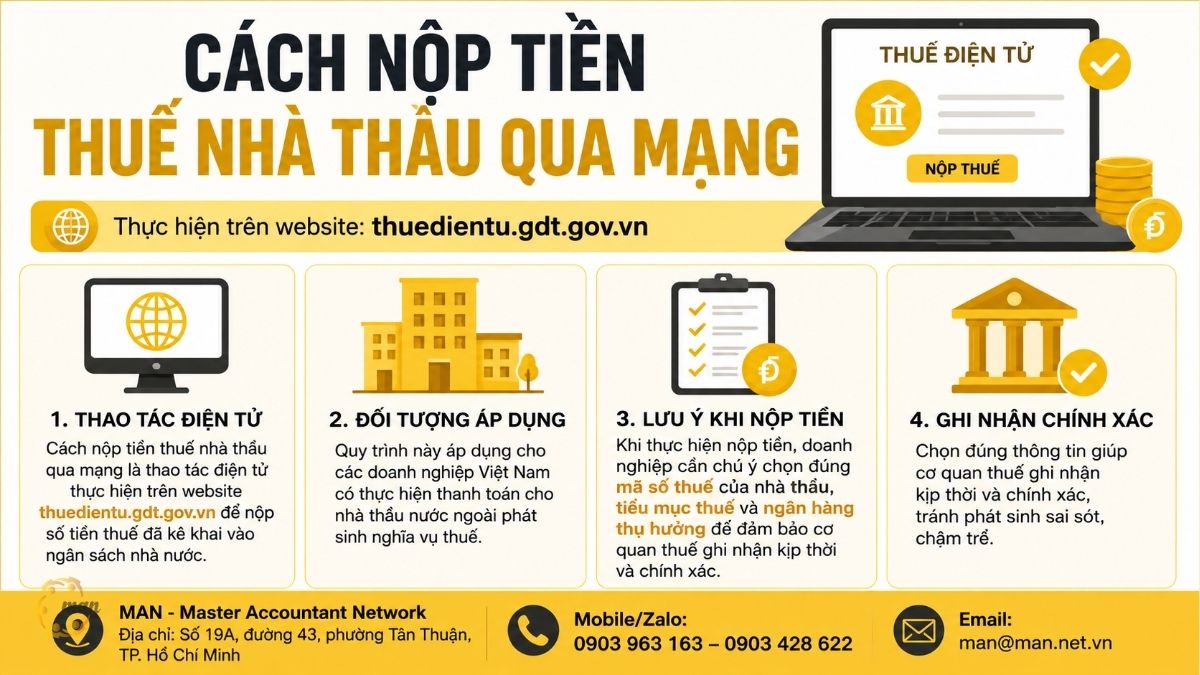
- Paying contractor tax online is an electronic process performed on the website thuedientu.gdt.gov.vn to deposit the declared tax amount into the state budget.
- This procedure applies to Vietnamese businesses that make payments to foreign contractors and incur tax obligations.
- When making payments, businesses need to pay attention to selecting the correct tax identification number of the contractor, the tax sub-item, and the beneficiary bank to ensure that the tax authorities record the payment promptly and accurately.
Contractor tax subjects and registration requirements
As prescribed in Circular 103/2014/TT-BTC, Contractor tax applies to foreign organizations and individuals doing business in Vietnam or earning income in Vietnam. Vietnamese businesses are responsible for withholding, declaring, and paying the tax on behalf of these entities.
To make the payment, the business must first complete the contractor tax registration. If the contractor does not yet have a tax identification number, the business needs to register through the direct tax authority. The lack of a tax identification number will lead to serious errors when preparing payment slips, making it difficult to verify data later.
From MAN's perspective, the biggest risk businesses often face is not clearly identifying the taxable subjects or applying the wrong tax rate. The latest contractor tax calculation formula for 2026.. Therefore, before submitting the payment, the accountant needs to cross-check all the data on the tax return.
How to file contractor tax returns online
Currently, contractor tax declarations are made electronically, saving time and reducing errors. Businesses only need an electronic tax account to prepare and submit the declaration.
Declare on the Vietnam Tax website.
- Step 1: Log in to thuedientu.gdt.gov.vn, select the Business tab. Log in using your tax identification number and password.
- Step 2: Click on Tax Declaration, then select Online Declaration. Choose the VAT and Corporate Income Tax Declaration Form for Foreign Contractors (Form 01/NTNN). Circular 89/2026/TT-BTC). Choose the appropriate declaration type and filing period.
- Step 3: Enter contract information, revenue, and tax details. Carefully review the information and select "Complete Declaration".
- Step 4: Select "Sign and submit the declaration." Use your digital signature (USB Token) for authentication. The system will report successful submission if there are no errors.
Declaration using the HTKK software.
- Step 1: Log in to the HTKK software using your company's tax identification number.
- Step 2: Select the Contractor Tax section, then select Foreign Contractor Tax Declaration Form (01/NTNN). Note that the form is based on Circular 89/2026/TT-BTC from July 2026.
- Step 3: Enter the indicators from [01a] to [12]. Fill in all the information about the contractor, contract, taxable revenue and applicable tax rate.
- Step 4: Export the XML file and submit the tax return through the electronic tax system.
Declaration through Public Service
- Step 1: Log in to the General Department of Taxation's Public Services website using your e-Tax account.
- Step 2: Select Administrative Procedures, search for the keyword "contractor" and select procedure code 1008333.
- Step 3: Select to submit the declaration according to Circular 80, upload the XML file exported from HTKK, digitally sign it, and send it.
- Step 4: Check the status of your application in the "Check Submitted Application" section. The status "Pending Acceptance" means the application has been successfully submitted.
Note regarding the deadline: Declarations must be submitted for each transaction no later than the 10th day of the payment date. Monthly declarations must be submitted no later than the 20th day of the following month.
Detailed instructions on how to pay contractor tax online.
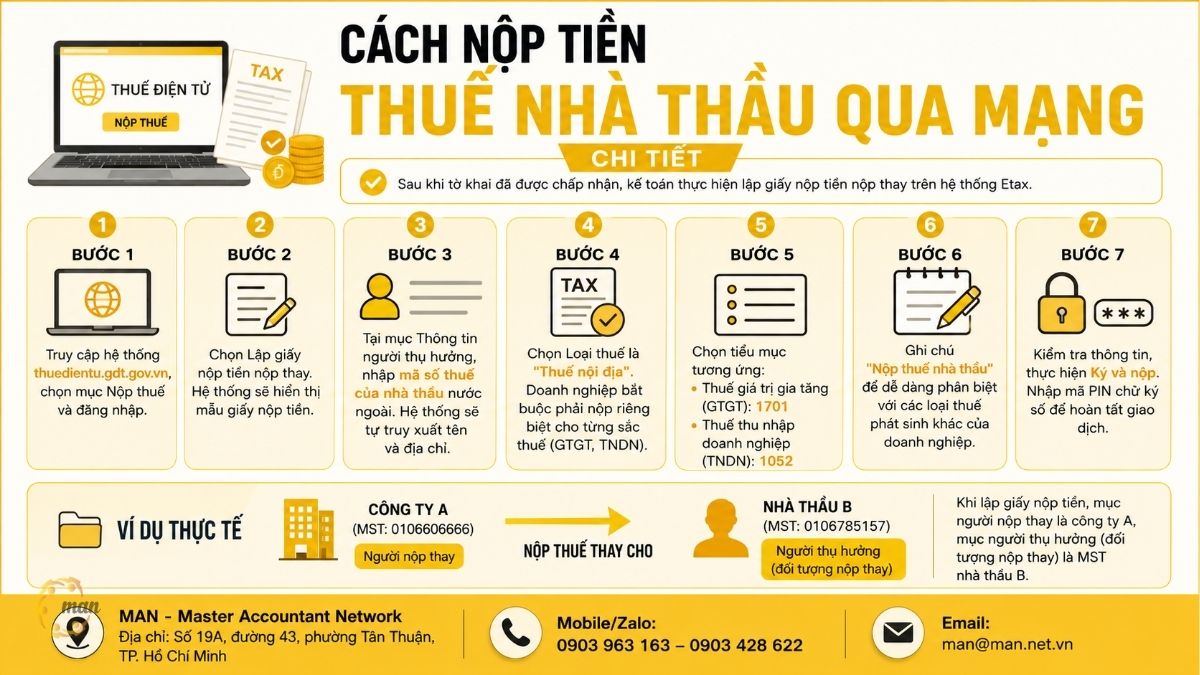
After the tax return has been accepted, the accountant will create a payment slip for the substitute payment on the Etax system.
Procedure for preparing a payment slip for substitute payments:
Step 1: Access the system at thuedientu.gdt.gov.vn, select the "Pay Taxes" section, and log in.
Step 2: Select "Create a payment slip for payment on behalf of someone else." The system will display a sample payment slip.
Step 3: In the Beneficiary Information section, enter the tax identification number of the foreign contractor. The system will automatically retrieve their name and address.
Step 4Select "Domestic Tax" as the tax type. Businesses are required to pay each tax separately (VAT, Corporate Income Tax).
Step 5: Select the corresponding subcategory:
- Value Added Tax (VAT): Select sub-item 1701.
- Corporate Income Tax (CIT): Select sub-item 1052.
Step 6: The note "Contractor Tax Payment" is included to easily distinguish it from other taxes incurred by the business.
Step 7: Verify the information, sign, and submit. Enter your digital signature PIN to complete the transaction.
Real life example: Company A (Tax ID: 0106606666) pays taxes on behalf of Contractor B (Tax ID: 0106785157). When preparing the payment slip, the payer is listed as Company A, and the beneficiary (the entity paying on behalf of) is the Tax ID of Contractor B.
Payment deadlines and risk management considerations.
The deadline for paying contractor tax depends on the declaration method:
- Declaration on a transaction-by-transaction basis: The deadline for tax payment is no later than the 10th day from the date the tax liability arises.
- Monthly tax filing: The deadline for paying taxes is no later than the 20th of the month immediately following the month in which the tax liability arises.
Experts at MAN – Master Accountant Network, with 30 years of experience, note that businesses should proactively schedule payments at least 1-2 days before the deadline to avoid system errors or problems with the bank.
Conclude
Paying contractor taxes online is an essential skill in modern tax management. Adhering to the process not only protects businesses from legal risks but also optimizes cash flow and enhances credibility with regulatory authorities.
If your business is struggling with tax settlement, tax reporting, or needs in-depth advice on risk management, contact MAN – Master Accountant Network. With a team of experts boasting over 30 years of experience, we are committed to providing the most transparent and effective financial solutions for businesses in Vietnam.
Tax services at MAN – Master Accountant Network
- Tax accounting services
- Tax consulting services
- Tax settlement services
- Tax reporting services
- VAT refund service
Service contact information at MAN – Master Accountant Network
- Address: No. 19A, Street 43, Tan Thuan Ward, Ho Chi Minh City
- Mobile/Zalo: 0903 963 163 – 0903 428 622
- E-mail: man@man.net.vn
- Google Business Profile: View MAN – Master Accountant Network's Google Business Profile
- LinkedIn Founder: View expert Le Hoang Tuyen's LinkedIn profile.
Responsible for production and professional content review by: Mr. Le Hoang Tuyen – Founder & CEO of MAN – Master Accountant Network, CPA Vietnam with over 30 years of experience in accounting, auditing, taxation, and corporate financial consulting.
Frequently Asked Questions (FAQ) about how to pay contractor tax online
What should I do if I submit the tax under the wrong category?
Businesses need to prepare a file to review and adjust tax payment information and submit it to the tax authority directly responsible for their management.
What types of taxes are included in contractor tax?
Typically, there is VAT and corporate income tax. For foreign individuals, additional personal income tax may apply.
Can I use my personal account to pay contractor tax on behalf of the company?
No, payments must be made from the business's bank account registered with the tax authorities.
Why is the system reporting that the contractor's tax identification number cannot be found?
The contractor may not yet have a tax identification number. You need to contact the tax authorities to register before making any payment.
Is there anything I need to note on the payment slip?
Adding a note about contractor tax payments makes it easier for the tax authorities to distinguish it from other types of taxes.